
For years, choosing between Snowflake and Databricks was straightforward: Snowflake was the premier managed cloud data warehouse for SQL analytics, while Databricks was the go-to Apache Spark platform for heavy data engineering and machine learning workloads.
By 2026, that distinction has largely blurred. Snowflake has significantly expanded developer capabilities with Snowpark, native container orchestration via Snowpark Container Services (SPCS), and managed AI features through Snowflake Cortex. Conversely, Databricks has solidified its enterprise business intelligence (BI) footprint using Serverless SQL Warehouses, the Photon execution engine, and Unity Catalog.
Despite overlapping feature sets, their underlying architectural philosophies remain fundamentally different. Selecting the wrong platform for your engineering workload can lead to six-figure cloud budget overruns and operational friction.
This technical breakdown compares Snowflake and Databricks across system architecture, real-world query performance, pricing mechanics, and enterprise AI readiness.
1. Architectural Foundations: Managed Warehouse vs. Open Lakehouse
The structural differences between both platforms govern how your organization handles data storage, compute scaling, and governance.
Snowflake: Multi-Cluster Shared Data Architecture
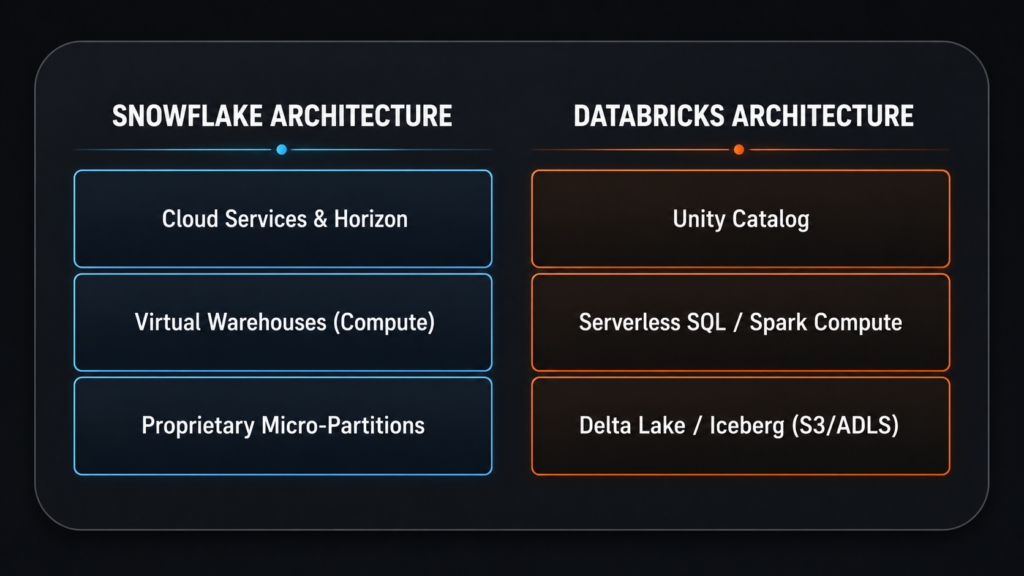
Snowflake decouples compute and storage into three fully managed layers:
- Storage Layer: Automatically ingests and organizes structured and semi-structured data into optimized, proprietary micro-partitions. Snowflake also natively supports open storage formats via Apache Iceberg tables backed by catalogs like Apache Polaris.
- Compute Layer: Executes jobs using independent clusters called Virtual Warehouses (ranging from X-Small to 6XL). This guarantees complete workload isolation—a heavy nocturnal ETL pipeline will never degrade real-time BI dashboard latency.
- Cloud Services Layer: Manages authentication, metadata management, transaction controls, and query optimization out of the box with zero manual indexing required.
Databricks: Open Lakehouse Paradigm
Databricks operates directly on top of your cloud object storage (AWS S3, Azure Data Lake Storage, or Google Cloud Storage):
- Storage Layer: Data resides in open-standard Parquet formats wrapped in Delta Lake or Apache Iceberg (via UniForm). You retain full physical control of your data layer without vendor lock-in.
- Compute Layer: Uses managed Apache Spark clusters or serverless SQL compute engines powered by Photon—a C++ vectorized execution engine purpose-built for raw Parquet file transformations.
- Governance Layer: Unified through Unity Catalog, providing single-pane governance for dataset access, column-level security, end-to-end data lineage, and ML model registries.
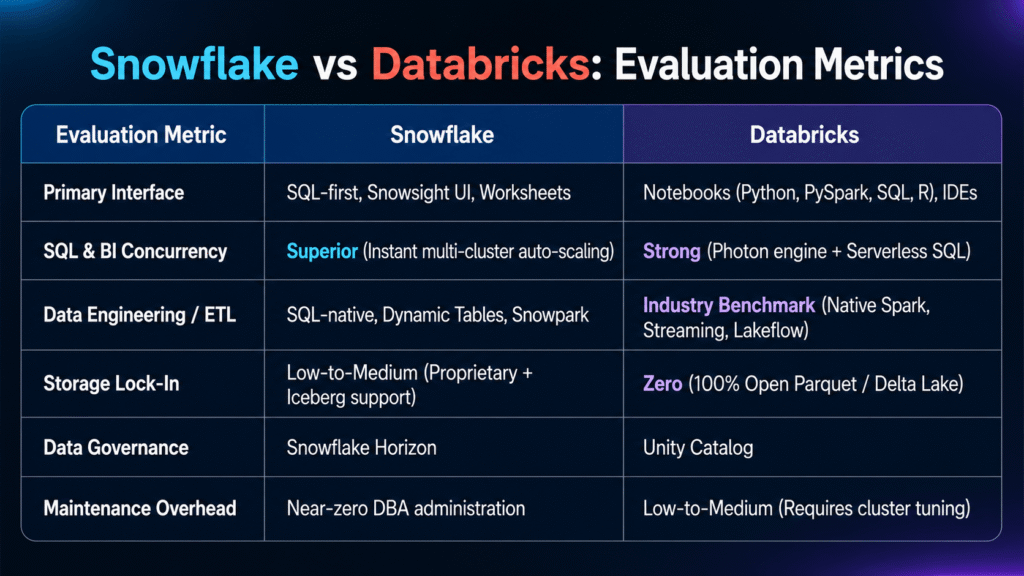
2. Core Feature & Performance Benchmark Matrix
3. Cost Models & Optimization Mechanics
Both vendors bill on consumption, but their pricing models behave differently under varying workloads.
Total Cloud Platform Cost Calculation:

Snowflake Cost  = (Snowflake Credits Consumed × Credit Tier Rate) + Cloud Storage Overhead

Databricks Cost = (DBUs Consumed × DBU Rate) + Underlying Cloud Compute Instances (EC2/Azure VMs)
Snowflake Pricing Dynamics:
- Mechanism: Charges in Snowflake Credits for compute, alongside flat monthly storage rates per Terabyte.
- Cost Predictability: Virtual warehouses auto-suspend after designated inactivity thresholds (e.g., 60 seconds), ensuring you only pay for active execution time.
- Risk Factor: Unmonitored multi-cluster auto-scaling left running continuously during ad-hoc testing can rapidly deplete annual credit commitments.
Databricks Pricing Dynamics
- Mechanism: Bills via Databricks Units (DBUs) alongside underlying cloud provider infrastructure rates (e.g., AWS EC2 or Azure Virtual Machines).
- Cost Efficiency: Highly cost-effective for massive, long-running batch processing and distributed PySpark data science jobs.
- Risk Factor: Improperly configured serverless SQL warehouses or instance sizing can accumulate unexpected cloud infrastructure charges.
4. Machine Learning & Enterprise Generative AI
Snowflake Cortex AI & SPCS
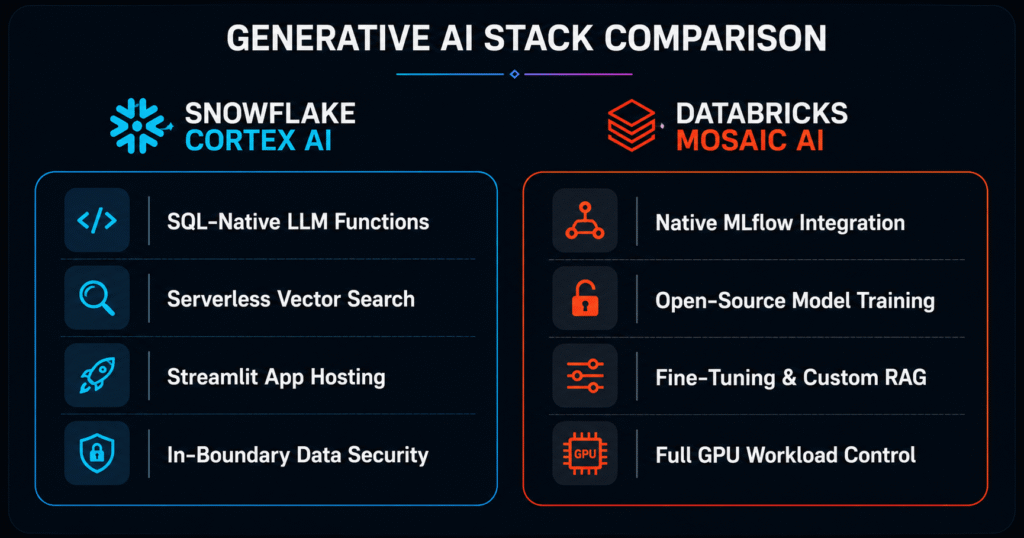
Snowflake focuses on bringing generative AI directly to governed enterprise data:
- Cortex AI: Exposes serverless SQL functions to invoke top-tier foundation models (such as Llama 3 and Claude) for text extraction, translation, sentiment analysis, and embedding generation inside SQL queries.
- Snowpark Container Services (SPCS): Allows data teams to run containerized full-stack applications, custom fine-tuned LLMs, and Streamlit interfaces directly inside Snowflake’s security perimeter.
Databricks Mosaic AI & MLflow
Databricks offers a developer-centric workbench for custom AI engineering:
- MLflow: Natively handles experiment tracking, artifact logging, model versioning, and deployment lifecycle management.
- Custom LLM Engineering: Built for teams training custom foundational models from scratch, managing distributed GPU clusters, or deploying agentic AI frameworks with fine-grained control.
5. Architectural Verdict: Which Platform Should You Deploy?
Deploy Snowflake if:
- Your core team relies heavily on SQL and Analytics Engineering. Snowflake requires minimal platform administration for teams comfortable with ANSI SQL and dbt.
- Your primary workload is enterprise BI, reporting, and high-concurrency dashboards. Snowflake’s auto-scaling virtual warehouses handle peak dashboard queries seamlessly.
- You require zero-copy cross-organizational data sharing. Snowflake’s native Data Cloud ecosystem simplifies multi-tenant data exchange.
Deploy Databricks if:
- Your engineering team works in Python, PySpark, and Scala. Your engineers thrive in interactive notebook environments, IDEs, and custom software pipelines.
- Your engineering team works in Python, PySpark, and Scala. Your engineers thrive in interactive notebook environments, IDEs, and custom software pipelines.
- You are building custom ML models, LLM pipelines, or multi-agent AI systems. The deep integration of MLflow, GPU compute control, and Unity Catalog provides a complete data science workspace.
Code Example: Querying Micro-Partitions vs Delta Lake
To illustrate developer experience differences, here is how both platforms inspect storage metadata:
Snowflake (SQL Micro-Partition Inspection)
-- Inspecting micro-partition health and clustering depth in Snowflake
SELECT SYSTEM$CLUSTERING_INFORMATION('ANALYTICS_DB.PROD.EVENTS', '(EVENT_DATE, USER_ID)');
Databricks (PySpark Delta Lake Detail)
# Inspecting Delta Lake transaction log and file layout in Databricks
from delta.tables import DeltaTable

deltaTable = DeltaTable.forPath(spark, "s3://my-company-lakehouse/events/")
history_df = deltaTable.history()
history_df.select("version", "timestamp", "operation", "operationParameters").show(5, truncate=False)